
See access
Current status, live monitoring, and a terminal dashboard. Process identity and context when the system makes them available.
mcw status --lang enA clearer view of your privacy.
Spot access, understand the evidence, and take action from your desktop. MicCamWatch observes system metadata — not your conversations or images.
Windows 10/11 · Linux x64 · macOS 15+
Native tool · Open source · No telemetry
Observe without recording
Understand before acting
Keep control local
Less opacity. More context.
MCW distinguishes observed activity, confidence level, and risk. Weak evidence does not become certainty.
Current status, live monitoring, and a terminal dashboard. Process identity and context when the system makes them available.
mcw status --lang enProcess, path, origin, and trust validation, depending on the OS. Diagnostics also show degraded or unavailable collectors.
mcw doctorMuting, camera commands, and launch at login: explicit actions limited to what the platform actually supports.
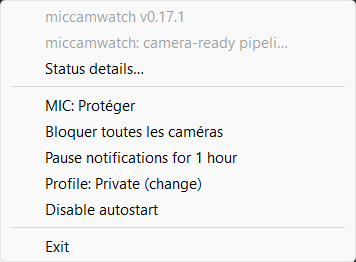
mcw tray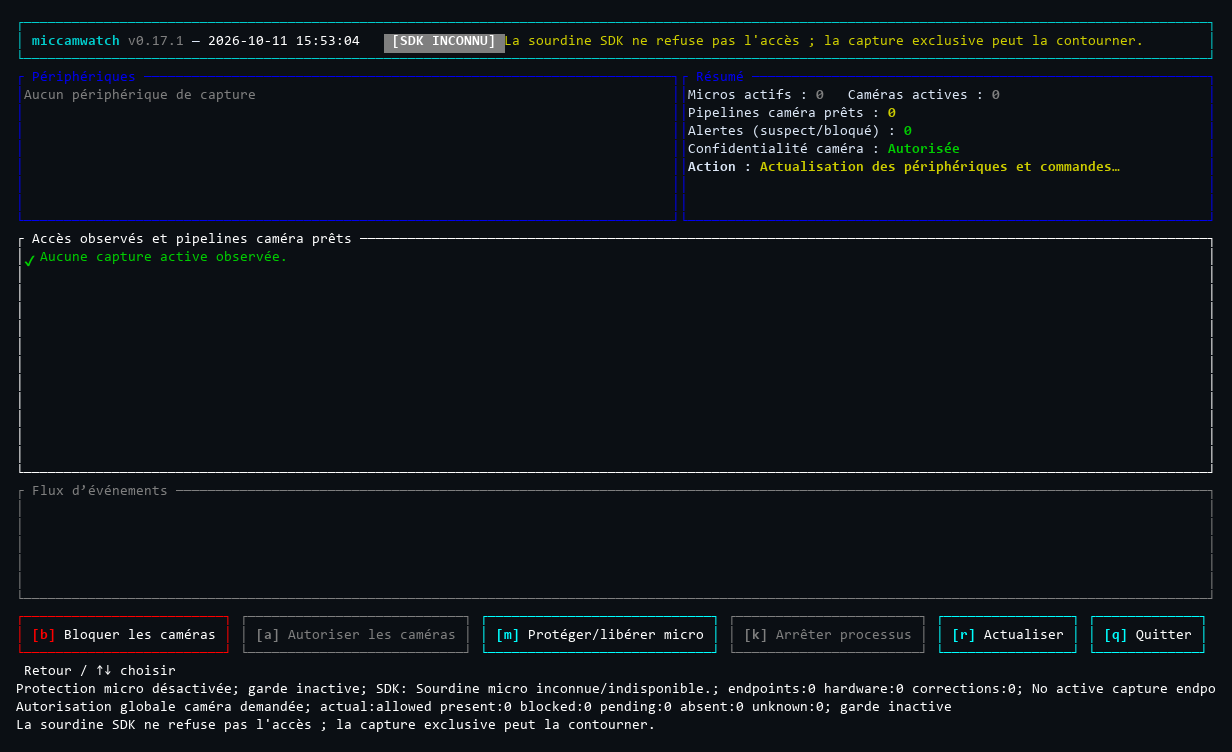
mcw top v0.17.1, run in Windows ConPTY in CI (150 columns), then rendered as an image. This runner has no capture devices, and its SDK mute state is unknown: it illustrates the interface, not detection or evidence of blocking on physical hardware. All screenshots on this page are from Windows.Three operating systems, different capabilities
Monitoring works without administrator privileges. Privileged actions require separate authorization.
| System | Microphone | Camera | Controls and limits |
|---|---|---|---|
| Windows 10/11 x64 | Active WASAPI sessions; process validated when accessible. | Native capture evidence; process attribution when available. Loaded modules: “ready” only. | Endpoint muting and camera device control with UAC. Manual protection is held in the background until explicitly released; no electrical isolation or guarantee for exclusive/ASIO paths. |
| Linux x64 · PipeWire | Source and running stream with an active link; PID authenticated, then validated in /proc. | The same active PipeWire link requirement applies. A V4L2 handle alone does not prove a stream exists; access outside PipeWire may go unobserved. | Session source muting, not an ALSA access ban. USB uvcvideo cameras are supported only through a separate, reviewed administrator component; non-USB cameras are not supported. |
| macOS 15+ Apple Silicon / Intel | CoreAudio input activity; PID validated if the process identity is readable. | Device running state via CoreMediaIO, medium confidence. Client and PID unknown. This signal does not prove an image stream exists; camera health is “degraded”. | Muting only if the input property is writable. MCW-owned camera profile, requiring manual approval in System Settings; its presence does not certify physical denial of access. |
Not a universal kill switch. MCW is neither antivirus software nor forensic proof of capture. A protected process, driver, direct access, or inaccessible session can limit observations and controls. WSL, virtual machines, and runners without hardware do not guarantee access to physical devices.
Resources: the 15 MB target has not been met. Documented measurements for the full Windows scenario exceed this target (sampled combined peak RSS: 56,041 MB, using a decimal comma). These measurements have limitations; no memory budget guarantee is claimed. Read the measurements and their scope ↗
A straightforward start
Stable version 0.17.2. Executables remain hosted on GitHub Releases, never on a mirror on this site.
curl --proto '=https' --tlsv1.2 -fsSL https://raw.githubusercontent.com/Roman-Cuisset/miccamwatch/a58c8b9f3a967589a576879d6d27bfdbc40f9dff/installer/install.sh | shThis command executes a remote script. Downloading and reading it first is safer. This is not a PowerShell command: on Windows, choose the MSI or ZIP below.
Without JavaScript or in an HTTP preview, the HTTPS link points to the script at the release’s immutable commit. On this site over HTTPS, the command is adapted to its local install.sh endpoint. Archives and their checksums are still downloaded from GitHub.
Commands remain selectable without JavaScript. The “Copy” button appears only if the browser provides its secure clipboard API; otherwise, select the text and use Ctrl+C, Cmd+C, or the selection menu.
The per-user MSI adds mcw to PATH and a shortcut to the Start menu. The portable ZIP contains the CLI + tray host pair; keep these two executables together and at the same version.
Reopen PowerShell after installation. For a ZIP installation not added to PATH, use .\mcw.exe instead of mcw.
mcw --version
mcw doctor
mcw status --lang en
mcw topRequires PipeWire/SPA libraries, pw-dump, and an accessible PipeWire socket in your user session. The tray requires a StatusNotifierItem host; notifications and sound require their session services.
The installer manages the executable under $HOME/.local/bin by default and checks the archive’s exact entry in SHA256SUMS. Unsupported architectures are rejected, not substituted.
The installer selects your native architecture. The menu bar requires an Aqua session. The native helper is bundled; no development environment is required for these archives.
The recommended alternative
Linux and macOS · This script is pinned to the release commit. Download and read it first; verify its checksum before running the separate installation command below.
curl --proto '=https' --tlsv1.2 -fsSL \
  https://raw.githubusercontent.com/Roman-Cuisset/miccamwatch/a58c8b9f3a967589a576879d6d27bfdbc40f9dff/installer/install.sh \
  -o mcw-install.sh
less mcw-install.shBefore execution, compare the file’s checksum: sha256sum mcw-install.sh on Linux, or shasum -a 256 mcw-install.sh on macOS. The expected value for the installer script (not the archives) is:
b7348c9a6f37a3d4f89faa2b767fd4880162d90c8f5d7c151185e0823384d1bbA checksum displayed through the same channel verifies byte consistency, not independent authenticity. Also consult the script at its immutable source.
After reading and verification, install version 0.17.2, explicitly requesting that it be added to PATH:
sh mcw-install.sh --version v0.17.2 --add-pathReplace --add-path with --no-modify-path to leave the shell configuration unchanged. Without a choice, the installer asks for consent in a terminal; it does not silently change PATH in non-interactive mode. Then open a new terminal. No automatic startup or device control is enabled.
Expected result on Unix: the script displays the download and verification steps, then Installation completed: mcw 0.17.2 for the explicitly requested version. Steps are colored in a compatible terminal (disable with NO_COLOR). It then explains how to run mcw top and, if necessary, use the full path or open a new terminal for PATH. This success concerns installation: it certifies neither device availability nor active protection.
Download your archive and SHA256SUMS from the same release. On Linux, use sha256sum --check --ignore-missing SHA256SUMS. On macOS, compare shasum -a 256 nom-de-l-archive.tar.gz with the exact manifest entry. In PowerShell, Get-FileHash .\miccamwatch-windows-x86_64.zip -Algorithm SHA256 lets you compare the ZIP checksum (adjust the name for the MSI).
GitHub attestations provide build provenance information. To verify with GitHub CLI, adjust the path to the downloaded file:
gh attestation verify ./miccamwatch-linux-x86_64.tar.gz \
  --repo Roman-Cuisset/miccamwatch \
  --signer-workflow Roman-Cuisset/miccamwatch/.github/workflows/release.yml \
  --source-ref refs/tags/v0.17.2 \
  --source-digest a58c8b9f3a967589a576879d6d27bfdbc40f9dff \
--deny-self-hosted-runnersChecksums and archives share the publication channel. Build provenance, publisher signing, and antivirus analysis are three different things. This site serves no binaries.
Homebrew / AUR: recipes exist in the repository; no published tap or AUR package is announced. Do not use an invented package-manager command.
Everyday use
Installation alone enables no protection, autostart, or process termination.
Display the version, collector status, and observed access. status returns 0 with no matching access, 1 with access, and 2 on error: exit code 1 is not a failure.
mcw --version
mcw doctor
mcw status --lang entop opens the dashboard. tray opens the native menu (Windows notification area, Linux StatusNotifierItem, macOS menu bar). Stop terminal monitoring with Ctrl+C.
mcw top
# Or monitor with notifications:
mcw watch --notifyOnly if you want to, register the tray to launch at login: Windows user task/entry, Linux .desktop file, or macOS LaunchAgent. No login service is installed implicitly.
mcw autostart enable
mcw autostart status
# To undo this:
mcw autostart disableAutomatic termination (--kill-unauthorized) is disabled by default. It requires explicit denial by a publisher/path policy, attributed active capture, two consecutive observations, and an unprotected process. A “suspicious” risk alone does not enable it; a macOS camera without a PID cannot trigger it.
An installation you remain in control of
Do not mix MSI, managed installer, manual archive, and package manager installations. The installation owner determines the procedure.
mcw update does not update the MSI registration.mcw update verifies and replaces a consistent CLI/tray pair after validating protection readiness and safely stopping the owned tray.mcw update or the public script with the same prefix. Without --version, the script follows stable latest. The updater rejects downgrades.bin under the documented conditions.mcw update.Managed updates preserve preferences and do not re-enable absent, disabled, or external autostart entries. An installation that is modified, active, or whose ownership cannot be verified is rejected; do not force a workaround.
--prefix if the installation used a custom prefix.mcw autostart disable
mcw tray stop
sh mcw-install.sh --uninstallThe Unix script removes only its owned executables/state and managed PATH blocks; it does not delete policies, preferences, history, or evidence of control ownership. Removing the application does not replace explicit restoration.
Local by default
No audio recording or image capture. No telemetry or history sent to a server.
Read the privacy policyMCW reads system signals and process information. Settings, policies, logs, and history stay local. Check the paths with mcw config settings-path and mcw history path; mcw history clear clears MCW history.
Installation and updates contact GitHub. An “online” trust policy allows native network checks of certificates or keys; “offline” prohibits them according to the platform. System logs follow their own retention rules.
No tracker, third-party library, or remote font. Optional JavaScript enhances tabs and copying; downloads and guides remain accessible without it. The hosting provider and GitHub may process normal request metadata, such as IP addresses.
When something is unclear
Start with mcw doctor. An unavailable collector is not an all-clear.
Open a new terminal after a PATH change. On portable Windows, use .\mcw.exe from the extracted folder. On Unix, try "$HOME/.local/bin/mcw" --version if you kept the default prefix. The installer cannot change its parent terminal’s environment.
If Defender quarantined the executable, PATH is not the problem: keep the Protection history details and follow the precautions below without restoring the detected bytes.
Camera activity may remain without an attributed PID when the native report provides no usable timestamp, even if Windows supplies a raw PID. Since version 0.17.2, the tray retains observed access and marks this partial coverage with an orange exclamation mark. Details identify the collector, its reason, and captures; genuine unavailability or a protection error still takes priority. Older versions may display a gray cross and a generic “telemetry degraded” summary.
Check Status details…, mcw status --lang en, mcw status --json, and mcw doctor to distinguish activity, attribution, and collector health. Unknown attribution means neither “no access” nor “camera blocked”: no client identity or authority to stop a process should be inferred from its name alone or a raw PID. The screenshots on this page remain explicitly historical, from 0.17.1.
Observation: run MCW in your user session without general elevation. System restrictions can make some identities or collectors unavailable; additional privileges do not guarantee attribution.
Windows: camera device changes require separate UAC authorization. Linux: USB camera controls first require the separate administrator component of the same version, then explicit Polkit authorization; the user installer does not deploy it. macOS: installing and removing the camera profile remain manual operations in System Settings, and notifications depend on system permission. MCW does not bypass TCC, Gatekeeper, or SIP; a profile’s presence does not prove capture is denied.
Run MCW in your desktop user session, not through sudo. Check pw-dump, PipeWire/SPA libraries, XDG_RUNTIME_DIR, the user socket, and PIPEWIRE_REMOTE if customized. An inaccessible or restarting socket is an error, not “no access”.
The tray requires a StatusNotifierItem host. Notifications need the session service and notify-send; sound needs canberra-gtk-play, a theme, and a session backend. An accepted call does not certify that a notification was seen or a sound heard. Direct camera access outside PipeWire may remain unattributed or degrade observation.
The public CoreMediaIO API reports the device’s running state, not the identity of the client using it. MCW therefore displays an unknown PID and degraded camera health rather than inventing attribution. AVFoundation availability and running state do not prove images were captured. Pending profile approval does not count as blocking.
No: do not disable protections or add an exclusion. The public 0.17.2 release is unsigned on Windows; no Apple Developer ID signature or notarization is announced. Warnings may therefore appear. A GitHub attestation describes a build, not its safety.
If Defender detects something, record the name, path, version, available hash, and Protection history details. Do not restore the quarantined file or automatically reinstall the detected bytes. The repository documents the incident and manual submission to Microsoft; no false-positive verdict is claimed. Signing, provenance, and safe handling ↗.
Not necessarily. On Windows, manual protection belongs to a native background broker and remains requested after closing the tray or top, until mcw unmute or mcw camera allow. This does not promise persistence across a restart. Linux and macOS retain their limited, one-shot controls: they do not inherit this Windows mechanism.
Check the actual status. A stopped Windows camera guard remains a warning: a “Block” intent alone does not prove protection of future connections. Explicitly restore before replacement or uninstallation, and resolve any pending state.
An active executable, requested protection, pending restoration, missing/modified receipt, or unsafe path can prevent an operation. Stop your watchers, complete privileged operations, and check control status. The script rejects root, modified/unowned targets, and unsafe links; it does not stop processes for you.
An older tray may require a normal manual exit: do not force it to quit during a camera operation. Do not delete ownership records to bypass rejection. Use the appropriate installation owner and the documented procedure.
mcw doctor --json and mcw status --json help with diagnostics, but paths, users, PIDs, devices, and application names may be personal information. Review and redact this data before attaching an excerpt to an issue. MCW does not automatically collect your reports; sharing remains voluntary. Technical evidence details stay in English to keep diagnostics stable.
Open, documented, auditable